Proposal Info
Areas: Animation, UX
Proposal Type: Overhaul
Overview
Based on user feedback, timeline has several UX issues, which make frame by frame animation workflow tedious and unintuitive.
Timeline component requires several improvements, primarily:
- [IMPROVEMENT]: An option to fallback to transparent frame for no-cel · Issue #1102 · PixiEditor/PixiEditor · GitHub - default behavior
- A toggle to record drawing, so clicking new cel is not required
- Inserting a cel next to the active frame
From my side, there are additional improvements, that I believe can make timeline even more pleasant to work with:
- An ability to move cels between layers
- Detect overlaping cels and display amount of them in the bottom right corner
Details
Inserting cels next to the active frame
Currently, PixiEditor places new cel in the first empty position to the right of active frame.
This was reported by the users as unintuitive and differs from what other animating apps do.
Solution is simple, for a setup: [1, 2 , 3] (3 cels, frame cursor is active on the second one)
Clicking “New frame” should move the third cel by one to the right, and put new cel in a position where third cel was placed [1, 2, 4, 3] instead of [1, 2, 3, 4]
Moving cels between layers
In a situation, where user places a cel on a wrong layer, or simply wants to move it to the other layer, copying and pasting is required. Giving 2 degrees of freedom when dragging cels can easily solve that issue.
Overlapping cels
Currently it is possible to drag two cels on the same spot. As a result, once cel gets lost, UI does not inform that it is placed there.
Solution 1:
A text in the bottom right, with number of frames displayed would solve the issue.
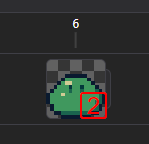
Additionally, “stacking” effect can be applied to make it more clear

Solution 2: Disallow frames from overlapping, each frame can be only occupied by one cel
Research references
- Timeline Overhaul - #9 by flabbet
- http://youtu.be/ND9KBtgGIHs?si=nGolqdxnOUKZ1Bfs&t=101
- Aseprite’s timeline behavior