Key Frame Animations

Proposal Info

Areas: Animation
Proposal Type: New Feature

Overview

Key Frame animations are composed out of key frames, a point in time with fixed value of given property. Two or more keyframes allows tweening between two values with optional easing.

PixiEditor is a perfect candidate for keyframes, each document is composed out of nodes. Each node has multiple properties. Tweening any arbitrary property within the timeline would greatly improve the animation workflow and open up possibilities for advanced animations.

Timeline

Key frames within timeline would look similarily to other software
From within the timeline, user would be able to pick a target node and a target timeline.

Node Graph Key Frame Node

To avoid confusion, Key Frame could be a node within the Node Graph, connected to target node and property. Chain of keyframes would create desired tweening.

Pros: Key frames are a part of the Node Graph and can be integrated any way.
Cons: Possible clutter, harder to maintain the Node Graph. Easier to break timeline.

Animated sockets

An alternative solution to Node Graph Key Frame Node chain, would be visually marking animated property socket.

Connecting other node to property that is animated using key frames, would overwrite animation. Appropriate information in the timeline should be shown, such as grayed out keyframes and “Animation overwritten in the Node Graph”.

Pros: Cleaner, more manageable way.
Cons: No direct access to key frames, from within the Node Graph

I’m more keen on this solution, rather than Key Frame Nodes, as exposing key frames to the Node Graph can be solved differently, while maintaining Graph with tons of nodes is harder.
Proposal status: open-for-discussion
For version: 2.2

I feel personally, having the animated properties/sockets would definitely be the clearer and more usable method of approaching this.

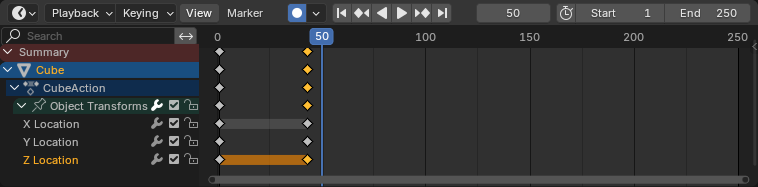
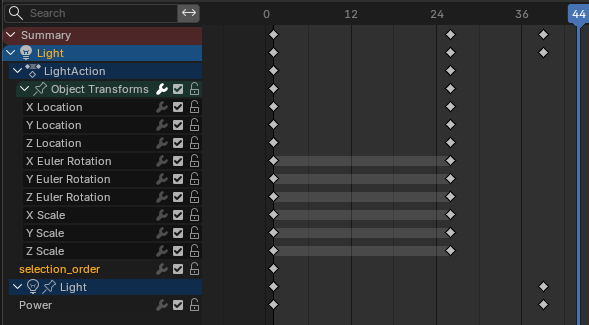
The big thing is that the timeline for animation can be visible on screen at the same time as the node graph so keeping tracking of what values have been key-frames and manipulating them can all be done in the timeline. Shown below is how the blender timeline handles it where it shows the values being keyed inside their relevant category with the keyframes then in the timeline at the height of the relevant value:

Where as with the keyframe node I feel it is a bit redundant as there is only a single timeline that exists so everything will need to either converge on the same node or there are multiple of the same node. The animated socket/value directly shows you what value is going to be affected and is directly on the node.

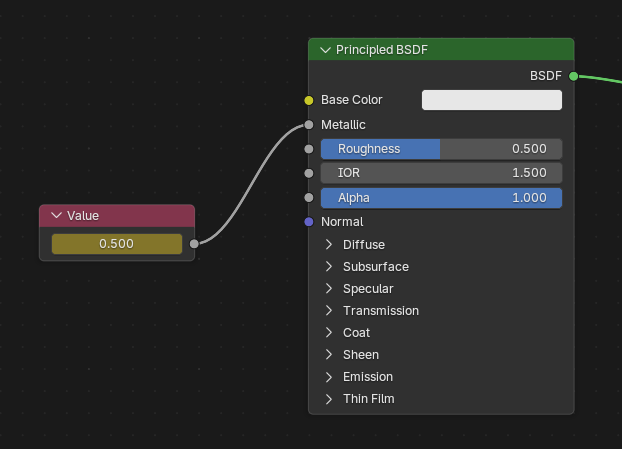
It is also able to produce a possible more useful node setup to the key frame node where you can have a variable node where for example you have a separate bool or float value for example which you then apply the keyframes to that and then connect that into the node you are trying to affect as shown below from a blender example:

You can then plug that value to influence multiple nodes with the same key-frames. There is also additional utility with variable nodes where you can have them become parameters for node groups that kind of act like classes or objects where you can have instances of a node group, but apply unique values to their expose parameters and stuff. That is however a bit of an unrelated tangent about variable nodes but a good example of it in practice would be Material Instances in Unreal Engine.

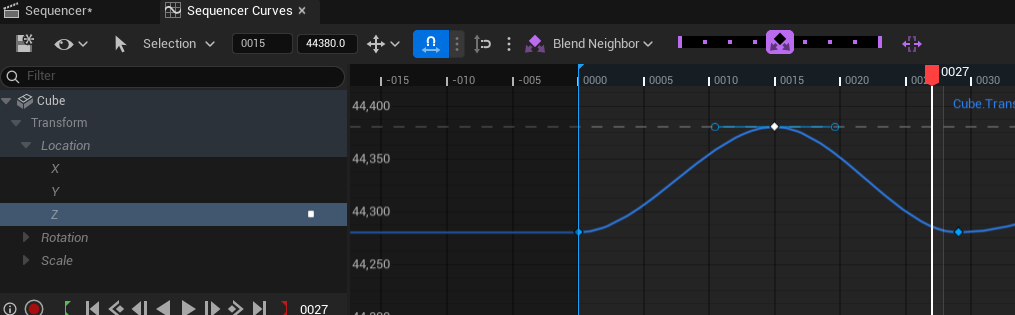
On the topic different interpolation options, another thing worth consider is the possibility of having a graph editor as it provides a lot more artistic control over the interpolation and whanot with the ability to adjust handles and troubleshoot faulty interpolation if it does happen. Of course a good example for a graph editor would be blender or even UE5’s sequencer as shown below:

But yeah this is an awesome proposal, it has a lot of potential for tweening the transforms of drawing layers which is very common in animation along with being able to animate attributes of effects/filter or any node in general with proper intent is very powerful. This also opens up the possibilities for future 2D or 3D rig support if they are ever considered.